
Website Development Company: Front-End vs Back-End – 10 Key Differences
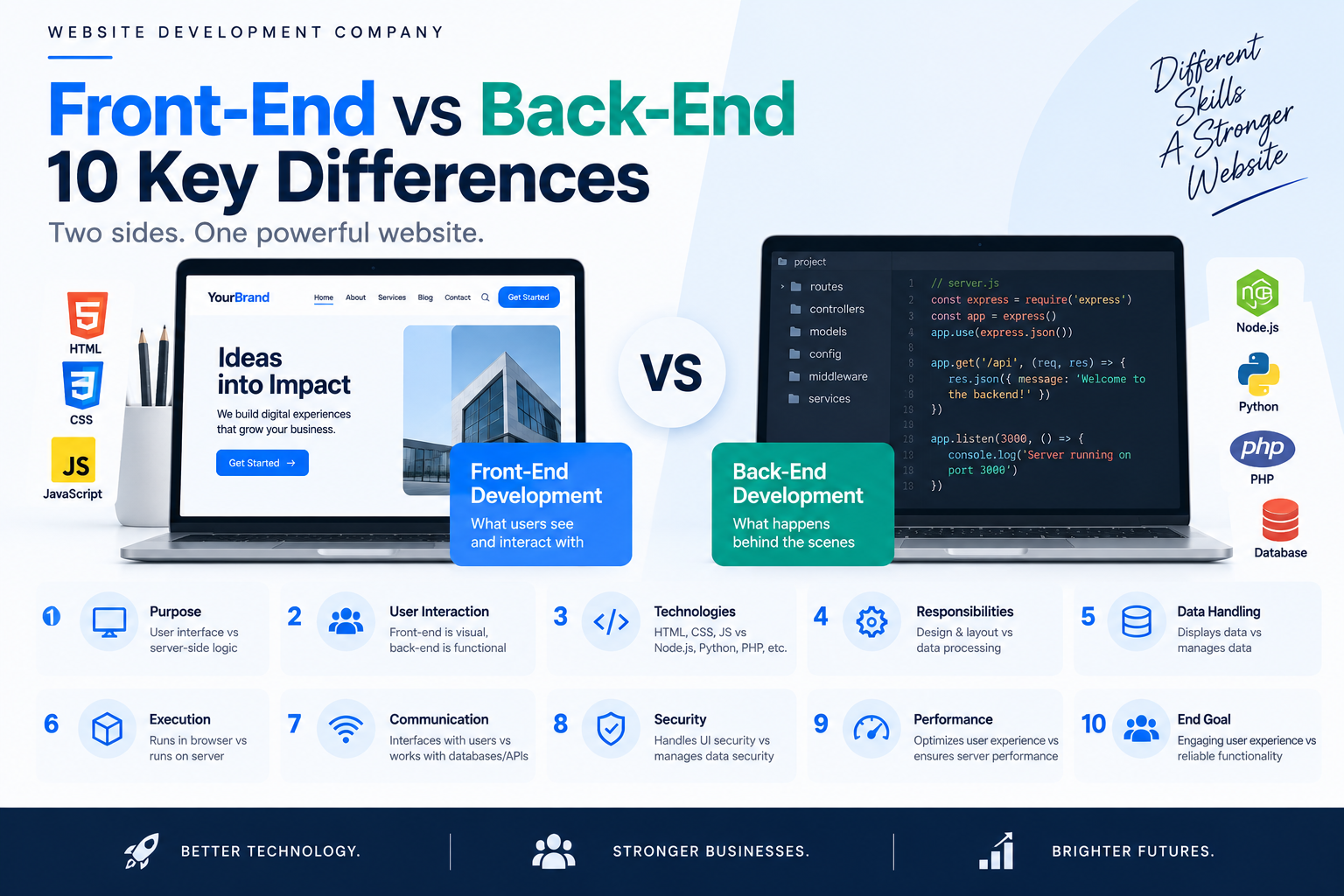
Website Development Company: Front-End vs Back-End – 10 Key Differences
A website may look simple from the outside, but several layers of technology work together every time someone visits a page, submits a form, creates an account, or completes a purchase.
Two of the most important parts of this system are front-end development and back-end development. The front end controls what users see and interact with, while the back end manages the logic, data, servers, authentication, and processes that operate behind the interface.
Understanding the difference between these two areas is useful for business owners, marketers, designers, and anyone planning a new website. It also helps explain why website projects involve more than visual design.
A professional Website Development Company usually works across both front-end and back-end technologies to create websites that are functional, responsive, secure, and scalable.
This guide explains the 10 key differences between front-end and back-end development, how they work together, which technologies are commonly used, and how businesses can choose the right development approach.
Table of Contents
What Is Front-End Development?
Front-end development refers to the part of a website or web application that users directly see and interact with.
When you open a website and see its navigation menu, headings, images, buttons, forms, product cards, animations, and page layouts, you are interacting with the front end.
The front end is sometimes called the client side because much of its code is processed by the user’s browser.
What Does Front-End Development Include?
Front-end development can involve:
-
Page layouts
-
Navigation menus
-
Buttons
-
Forms
-
Images and media
-
Typography
-
Responsive layouts
-
Animations
-
Interactive components
-
Search interfaces
-
Product displays
-
Error messages
-
Accessibility features
The front end is responsible for turning a design into an interactive interface.
For example, a designer may create a button that says “Add to Cart.” A front-end developer makes that button appear correctly, respond to clicks, work on mobile devices, and communicate with the appropriate back-end functionality.
Main Front-End Technologies
The three fundamental technologies are:
HTML — provides the structure of a webpage.
CSS — controls presentation, layout, spacing, typography, and visual appearance.
JavaScript — adds interactivity and dynamic behavior.
Modern projects can also use front-end frameworks and libraries to build more complex interfaces.
A Website Development Company chooses front-end technologies based on the website’s requirements rather than simply using a particular framework because it is popular.
What Is Back-End Development?
Back-end development handles the systems and logic operating behind the website interface.
Users generally do not see the back-end directly, but they depend on it whenever they perform actions that require data processing.
For example, when a user logs into an account, the visible login form belongs to the front end. The process that verifies the credentials, checks the database, creates a session, and determines what information the user can access is handled by the back end.
What Does Back-End Development Include?
Back-end development can involve:
-
Server-side programming
-
Databases
-
APIs
-
Authentication
-
Authorization
-
Business logic
-
Data processing
-
File management
-
Payment processing
-
User accounts
-
Security controls
-
Server configuration
The back end essentially provides the infrastructure that allows a website to perform tasks beyond displaying static information.
Example of Back-End Functionality
Consider an eCommerce website.
A customer selects a product and clicks “Buy Now.”
The front end handles the customer’s interaction with the button.
The back end may then:
-
Receive the request.
-
Identify the product.
-
Check availability.
-
Calculate the order.
-
Process relevant customer information.
-
Communicate with the payment gateway.
-
Store the order in a database.
-
Update inventory.
-
Return a result to the front end.
The customer sees the final result, but most of the processing occurs behind the scenes.
Front-End vs Back-End: How They Work Together
Front-end and back-end development are not competing approaches. They are two connected parts of the same system.
A useful way to understand their relationship is to think about a restaurant.
The front end is similar to the dining area, menu, tables, and interaction with customers.
The back end is similar to the kitchen, storage, order processing, and systems that prepare what customers request.
A website works in a similar way.
The front end collects user interactions and presents information. The back end processes requests, manages data, and sends information back to the interface.
Simple Website Request Example
Imagine a visitor opens a product page.
The process may look like this:
User → Browser → Front End → API/Server → Database → Server → Front End → Browser → User
The front end requests information from the back end.
The back end retrieves or processes the necessary information and sends a response.
The front end then displays that information to the visitor.
This communication allows modern websites to provide dynamic experiences instead of simply displaying fixed HTML pages.
10 Key Differences Between Front-End and Back-End Development
1. User Interface vs Server-Side Logic
The first major difference is their primary responsibility.
Front End
The front end focuses on the user interface and interaction.
It determines how users experience the website visually and functionally.
Examples include:
-
Menus
-
Buttons
-
Forms
-
Cards
-
Images
-
Sliders
-
Navigation
-
Interactive elements
Back End
The back end focuses on server-side logic and data processing.
Examples include:
-
Authentication
-
Database queries
-
Order processing
-
API operations
-
User permissions
-
Business rules
In simple terms:
Front end = what users interact with.
Back end = what makes those interactions work.
Both are necessary for most complex websites.
2. Client Side vs Server Side
Front-end code primarily operates in the user’s browser.
When someone loads a webpage, the browser interprets HTML, CSS, and JavaScript to construct the interface.
Back-end code generally runs on a server.
The server receives requests, processes information, communicates with databases or external services, and sends responses back to the browser.
Example
When someone searches for a product:
-
The front end provides the search field.
-
The browser sends the request.
-
The back end processes the search.
-
The database provides matching records.
-
The server sends the results.
-
The front end displays them.
This division allows websites to handle complex operations without exposing sensitive server-side logic to users.
3. Technologies Used
Front-end and back-end development use different technology categories.
Common Front-End Technologies
-
HTML
-
CSS
-
JavaScript
-
React
-
Vue
-
Angular
-
Svelte
Common Back-End Technologies
-
Node.js
-
Python
-
PHP
-
Java
-
C#
-
Ruby
-
Go
The exact technology stack depends on the project’s requirements.
For example, a content-focused business website may require a very different stack from a high-traffic web application.
A Website Development Company evaluates factors such as functionality, scalability, hosting, developer expertise, security, and maintenance before selecting technologies.
4. Primary Responsibilities
Front-end and back-end developers solve different categories of problems.
Front-End Responsibilities
Front-end developers may be responsible for:
-
Converting designs into code
-
Creating responsive layouts
-
Implementing navigation
-
Building interactive components
-
Improving accessibility
-
Optimizing browser-side performance
-
Connecting interfaces to APIs
Back-End Responsibilities
Back-end developers may handle:
-
Server-side logic
-
Database design
-
API development
-
Authentication
-
Authorization
-
Data validation
-
Payment processing
-
Business rules
-
Server configuration
The two teams often collaborate closely because changes on one side can affect the other.
5. Performance Factors
Both front-end and back-end development can influence website performance, but they affect different parts of the experience.
Front-End Performance
Front-end performance can be affected by:
-
Large images
-
Excessive JavaScript
-
Unoptimized CSS
-
Too many third-party scripts
-
Poor resource loading
-
Heavy animations
-
Inefficient rendering
Back-End Performance
Back-end performance can be influenced by:
-
Server response time
-
Database queries
-
Server configuration
-
API response times
-
Application architecture
-
Caching
-
Traffic volume
A slow database can delay the entire page even if the front-end code is optimized.
Likewise, a fast server cannot completely compensate for a poorly optimized interface.
Performance therefore needs to be considered across the entire system.
6. Security Responsibilities
Security is another area where front-end and back-end development have different responsibilities.
Front-End Security
Front-end developers need to consider:
-
Safe handling of user input
-
Secure communication
-
Avoiding unsafe client-side practices
-
Preventing exposed sensitive information
-
Safe use of third-party scripts
Back-End Security
Back-end systems typically handle more sensitive security responsibilities, including:
-
Authentication
-
Authorization
-
Password management
-
Database security
-
Input validation
-
Session management
-
Access control
-
API security
Sensitive business logic should not be trusted to the client side alone because users can inspect and manipulate browser-side code.
A Website Development Company should therefore implement security controls at the appropriate layers instead of assuming front-end protection is sufficient.
7. Data Handling
Front-end and back-end systems have very different roles when dealing with data.
The front end can collect and display information.
For example, a registration form may collect:
-
Name
-
Email address
-
Phone number
-
Password
However, the back end is responsible for processing that information securely.
It may:
-
Validate the submitted data.
-
Check whether the email already exists.
-
Securely process the password.
-
Store appropriate information in the database.
-
Create an account.
-
Return a response to the front end.
Why This Separation Matters
Storing sensitive information directly in browser-side code is unsafe.
The back end provides controlled access to databases and business logic.
This separation is one of the reasons modern websites can support accounts, orders, dashboards, and other personalized functionality.
8. Scalability
Scalability refers to a system’s ability to handle increasing demands.
Front-end scalability involves maintaining an interface that remains manageable as features and content increase.
Back-end scalability involves handling increased:
-
Users
-
Requests
-
Database records
-
Transactions
-
API calls
-
Traffic
For example, a website may initially serve 1,000 visitors per month but eventually receive hundreds of thousands.
The back-end architecture may need changes to handle the increased load.
A Website Development Company should consider future requirements when designing the architecture instead of focusing only on the website’s initial launch.
9. Testing Requirements
Front-end and back-end components require different testing approaches.
Front-End Testing
Testing may include:
-
Responsive behavior
-
Browser compatibility
-
Navigation
-
Forms
-
Visual layouts
-
Accessibility
-
Interactive components
-
JavaScript functionality
Back-End Testing
Testing may include:
-
APIs
-
Database operations
-
Authentication
-
Authorization
-
Business logic
-
Error handling
-
Data validation
-
Security
For an eCommerce website, developers might test whether a product can be added to a cart on the front end and whether the order is correctly recorded in the database on the back end.
Testing both sides ensures that individual components work correctly and that the entire system communicates properly.
10. Visibility to the User
The final difference is how directly users interact with each layer.
The front end is highly visible.
Users directly experience:
-
Design
-
Layout
-
Navigation
-
Content
-
Forms
-
Interactions
-
Loading behavior
The back end is mostly invisible.
Users generally do not know which database query was executed or which server-side process handled their request.
However, they notice the results.
If the back end is slow, users may experience slow pages.
If authentication fails, users cannot access their accounts.
If the database is unavailable, products or content may not load.
This is why both layers must be designed carefully.
Front-End vs Back-End Comparison Table
| Factor | Front-End Development | Back-End Development |
|---|---|---|
| Main focus | User interface | Server-side functionality |
| Location | Browser/client | Server |
| User visibility | Directly visible | Mostly invisible |
| Main technologies | HTML, CSS, JavaScript | PHP, Python, Node.js, Java, etc. |
| Handles | Interface and interaction | Logic and data |
| Databases | Usually accesses data through APIs | Directly manages database operations |
| Performance | Rendering and browser performance | Server and database performance |
| Security | Client-side protections | Authentication, authorization, data protection |
| Testing | UI, browsers, responsiveness | APIs, databases, logic, security |
| Main goal | Usability and interaction | Functionality and data processing |
Common Front-End Technologies
HTML
HTML provides the structural foundation of web pages.
It defines elements such as:
-
Headings
-
Paragraphs
-
Links
-
Images
-
Forms
-
Lists
-
Tables
Without HTML, there would be no structured webpage content for browsers to interpret.
CSS
CSS controls the visual presentation of HTML.
It handles:
-
Colors
-
Typography
-
Spacing
-
Layouts
-
Responsive behavior
-
Transitions
-
Visual positioning
JavaScript
JavaScript adds behavior and interactivity.
It can be used for:
-
Dynamic forms
-
Menus
-
Real-time updates
-
Interactive dashboards
-
Client-side validation
-
API communication
-
Dynamic content
Front-End Frameworks
Frameworks and libraries can help developers organize large applications and reusable components.
Examples include React, Angular, Vue, and Svelte.
The right choice depends on project requirements, development expertise, performance considerations, and long-term maintenance.
Common Back-End Technologies
Node.js
Node.js allows developers to run JavaScript on the server and is commonly used for APIs and web applications.
PHP
PHP remains widely used for server-side web development and powers many content management systems and websites.
Python
Python is used in web development through frameworks such as Django and Flask and can also connect web applications with data-processing and automation systems.
Java
Java is used for many large-scale applications where structured architecture, performance, and enterprise requirements are important.
C#
C# is commonly used with Microsoft’s .NET ecosystem for web applications, APIs, and enterprise systems.
Databases
Back-end systems often work with databases such as:
-
MySQL
-
PostgreSQL
-
Microsoft SQL Server
-
MongoDB
Database selection depends on how information needs to be stored, queried, updated, and scaled.
What Is Full-Stack Development?
Full-stack development involves working across both front-end and back-end technologies.
A full-stack developer may be capable of handling:
-
Interface development
-
Server-side programming
-
Database operations
-
APIs
-
Authentication
-
Deployment
-
Integration
However, full-stack development does not mean one person must handle every task alone.
Large projects may still require specialized front-end developers, back-end developers, designers, QA engineers, DevOps professionals, and security specialists.
A Website Development Company may use a combination of specialists and full-stack developers depending on project size and complexity.
Why Businesses Need Both Front-End and Back-End Development
A website can have an excellent visual design and still fail if the underlying functionality is unreliable.
Likewise, a technically powerful back end is not enough if users cannot navigate the interface easily.
Front End Creates the User Experience
It helps visitors:
-
Understand information
-
Navigate pages
-
Interact with features
-
Complete forms
-
Browse products
-
Perform actions
Back End Provides the Functionality
It helps the website:
-
Store information
-
Process requests
-
Authenticate users
-
Connect systems
-
Manage transactions
-
Apply business rules
The best websites treat these two areas as interconnected parts of one system.
How a Website Development Company Combines Both
A professional Website Development Company usually begins by understanding the complete website requirement rather than separating design and programming into unrelated tasks.
The development process may involve:
Step 1: Define Requirements
The team identifies what users need and what the business needs the website to accomplish.
Step 2: Plan the Architecture
Developers determine how the front end, back end, database, APIs, hosting environment, and external services will communicate.
Step 3: Design the Interface
UI/UX designers create the visual structure and user flows.
Step 4: Build the Front End
Developers convert approved designs into responsive, interactive interfaces.
Step 5: Build the Back End
Developers create server-side functionality, databases, APIs, authentication, and business logic.
Step 6: Connect Both Layers
APIs and other communication methods allow the front end to request and submit information to the back end.
Step 7: Test the Complete System
The team tests individual components and complete user journeys.
Step 8: Deploy and Monitor
The finished website is deployed and monitored for technical, performance, and security issues.
This coordinated approach reduces the risk of developing a visually impressive website that lacks the functionality required by the business.
Common Development Mistakes
Focusing Only on Design
A beautiful interface cannot compensate for broken functionality.
Choosing Technologies Without Considering Requirements
The newest framework is not automatically the best technology for every project.
Ignoring Mobile Users
Front-end development should account for different devices and screen sizes from the beginning.
Putting Sensitive Logic in the Front End
Important business rules and sensitive operations should be handled securely on the server.
Poor API Design
When front-end and back-end systems communicate through poorly designed APIs, applications can become difficult to maintain.
Ignoring Database Performance
Poorly designed queries and database structures can create serious performance problems as traffic grows.
Skipping Security Testing
Security should be incorporated throughout development rather than treated as a final checklist item.
Failing to Plan for Growth
A website that works for a small number of users may need architectural changes when traffic and data increase.
How to Decide What Your Website Needs
Not every business needs a highly complex technical architecture.
A basic informational website may require:
-
Responsive front-end development
-
Content management
-
Contact forms
-
Analytics
-
Basic integrations
An eCommerce website may require:
-
Product management
-
User accounts
-
Shopping carts
-
Payment processing
-
Inventory systems
-
Order management
-
Customer notifications
A custom web application may require:
-
Complex databases
-
User roles
-
APIs
-
Dashboards
-
Advanced authentication
-
Real-time functionality
-
External integrations
The appropriate architecture should therefore be based on actual requirements.
A Website Development Company can help determine which technologies and development approach are appropriate for the project’s size, functionality, budget, and future plans.
Conclusion
Front-end and back-end development are two essential parts of modern website development, but they solve very different problems.
The front end is responsible for the interface users see and interact with. It handles layouts, navigation, forms, visual components, responsiveness, and browser-side interactions.
The back end operates behind that interface. It handles databases, authentication, APIs, business logic, server-side processing, and other functionality required to make the website work.
The most important differences involve their location, responsibilities, technologies, security roles, performance factors, data handling, scalability, testing requirements, and visibility to users.
Neither layer should be treated as more important than the other. A successful website needs a strong interface and reliable underlying systems.
When a Website Development Company plans both layers together, it can create a website that is easier to use, easier to maintain, more secure, and better prepared for future growth.
Understanding the difference between front-end and back-end development also helps businesses communicate more effectively with developers and make better decisions about website technology. Instead of evaluating a website only by its appearance, businesses can consider the complete system behind it—from the first click on the screen to the database and server processes that make that action possible.
FAQs
1. What is the difference between front-end and back-end development?
Front-end development focuses on the part of a website users see and interact with, while back-end development handles server-side logic, databases, APIs, authentication, and other processes operating behind the interface.
2. Is front-end or back-end development more important?
Neither is more important. They perform different functions and need to work together. A strong front end with a weak back end can create functionality problems, while a powerful back end with a poor interface can create usability problems.
3. What technologies are used for front-end development?
Common front-end technologies include HTML, CSS, and JavaScript. Developers may also use frameworks and libraries such as React, Vue, Angular, and Svelte.
4. What technologies are used for back-end development?
Common back-end technologies include Node.js, PHP, Python, Java, C#, Ruby, and Go. Back-end systems may also use databases such as MySQL, PostgreSQL, MongoDB, or Microsoft SQL Server.
5. What does a front-end developer do?
A front-end developer creates and implements the part of a website that users interact with. This includes layouts, navigation, forms, responsive behavior, interactive elements, and browser-side functionality.
6. What does a back-end developer do?
A back-end developer works on server-side functionality such as databases, APIs, authentication, business logic, data processing, and server communication.
7. What is a full-stack developer?
A full-stack developer works across both front-end and back-end technologies. They may build interfaces, server-side functionality, databases, APIs, and other parts of a web application.
8. Does every website need back-end development?
No. A simple static website may require little or no custom back-end functionality. However, websites requiring accounts, databases, payments, dashboards, dynamic content, or complex integrations generally need back-end systems.
9. How does front-end development affect SEO?
Front-end development can influence factors such as page structure, mobile usability, performance, accessibility, content presentation, and how efficiently browsers render pages. These areas can contribute to the overall technical quality of a website.
10. How does back-end development affect website performance?
Back-end performance can affect server response times, database queries, API responses, caching, and the speed at which requested information becomes available to the browser.
11. Should a small business hire a Website Development Company?
A Website Development Company can be useful when a business needs professional development, custom functionality, integrations, responsive design, technical SEO, security, or ongoing maintenance. The right approach depends on the project’s requirements and budget.
12. Can front-end and back-end developers work separately?
Yes, but they need clear communication and defined interfaces between their work. APIs, technical specifications, shared requirements, and testing processes help front-end and back-end teams work together effectively.
13. Why are APIs important in web development?
APIs allow different software components to communicate. A front end can use an API to request information from a back-end system, while the back end can use APIs to communicate with payment gateways, CRMs, analytics tools, and other external services.
14. What should businesses consider when choosing a Website Development Company?
Businesses should consider relevant experience, development processes, technology expertise, security practices, performance optimization, testing, scalability, communication, maintenance, and post-launch support.
Choosing the right development approach is essential for building a reliable and high-performing website. At Gowenza, our [Web Development]services combine front-end design, back-end functionality, responsive development, SEO, and performance optimization to create websites tailored to business requirements. You can also explore our guides on [website performance] and [regular website maintenance] to learn how ongoing optimization can keep your website fast, secure, and reliable.
Front-end and back-end development both require following reliable web standards for performance, accessibility, and security. Businesses and developers can refer to Google Search Central for SEO best practices, web.dev for modern web development and performance guidance, MDN Web Docs for front-end and web technology documentation, and OWASP for web application security guidance. These trusted resources can help development teams make informed technical decisions throughout the website development process.